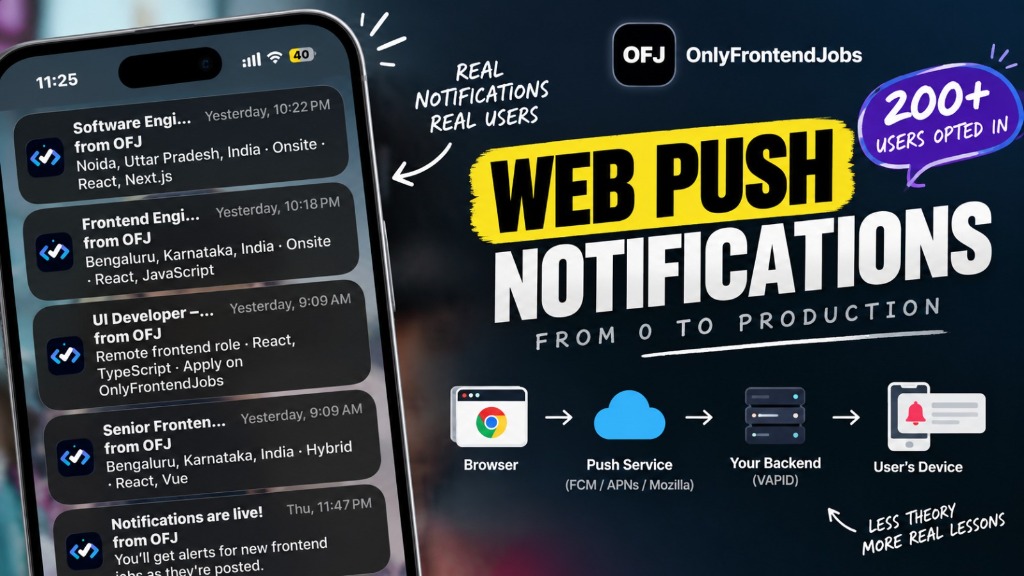
A job board is a strange place to learn how notifications work. The message has to arrive when a role goes live, on a device you do not control, in a browser you have never opened, and it has to be worth interrupting someone's evening for.
I expected the hard part to be the encryption. It was not. The hard part was everything around it: asking for permission at a moment when the ask makes sense, admitting that iOS works differently, and cleaning up subscriptions for people who uninstalled the browser six months ago.
More than 200 people have job alerts switched on right now. Here is how the system is built, how the pieces connect, and the edge cases that only showed up after shipping to real users.
What web push notifications actually run on
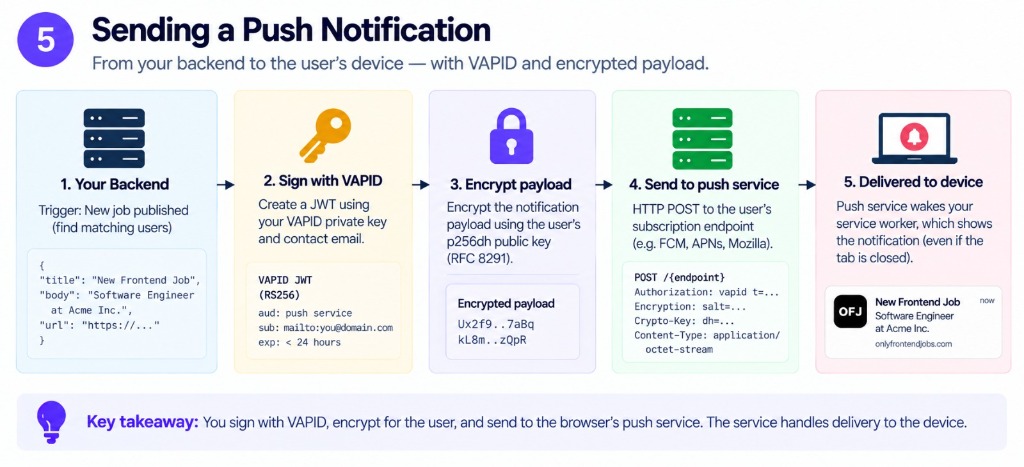
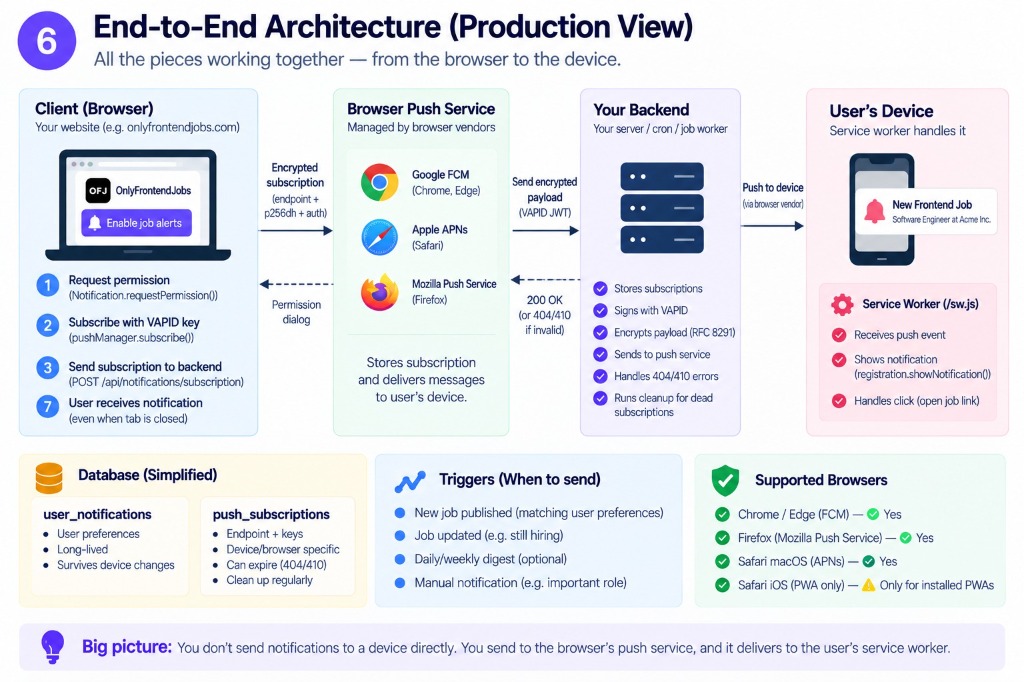
A push notification is not a page the browser pulls. Your server hands a signed message to the browser vendor's push service, and that service wakes a service worker on the device to draw it. The tab does not have to be open, which is the trick and also where all the complexity lives.
| Piece | Job |
|---|---|
A service worker at /sw.js | Receives the push event and calls showNotification |
| A push subscription | An endpoint URL plus p256dh and auth keys, one per browser profile |
| A VAPID key pair | Lets the push service confirm the sender is really you |
| Permission | Notification.permission, and on iOS an installed home screen app |
Miss any one and nothing arrives, usually with no error anywhere. MDN records the
Push API as widely
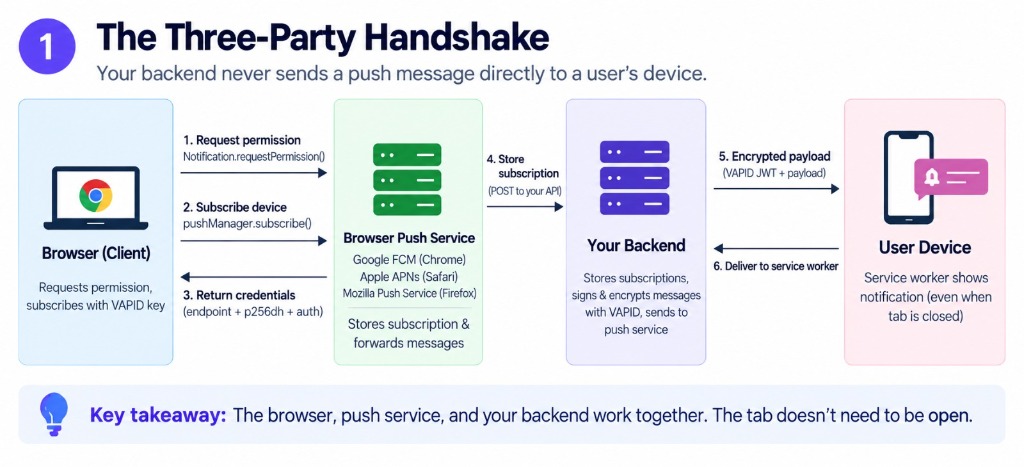
The vendor push service (Google FCM for Chrome, Apple APNs for Safari, Mozilla for Firefox) acts as the neutral gateway between your backend and the device. You never talk directly to a phone or laptop.
What we actually shipped: decoupling the inbox from push
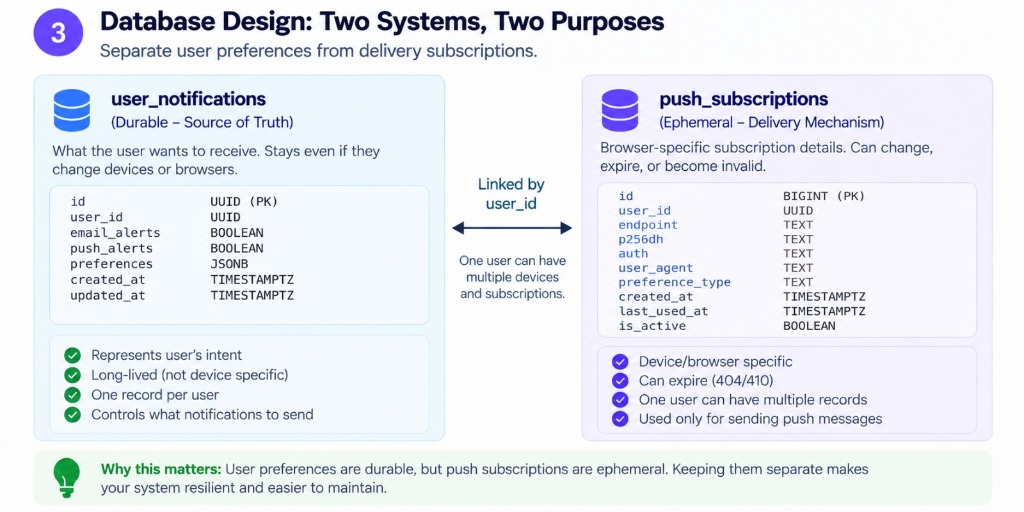
There are two notification systems, and keeping them apart is the main design decision here.
The in-app inbox is a row in user_notifications, tied to your profile, and
it is the source of truth: every alert you are eligible for gets a row whether or
not a browser ever showed a popup. The browser push rides on top of it. It is
delivery, not the record, which is why someone who clicked Block on the prompt
still finds the alert waiting when they come back.
The toggle lives on the profile page and in the header bell. It is a column on
profiles, push_notifications_enabled, defaulting to false. Everything else
checks that flag. The bell caps its counter at 9+ too, because a thirty-job
publish burst should not turn the header into an anxiety meter.
The permission prompt is a funnel, not a button
Asking for notification permission on page load is the fastest way to get blocked forever. You get one clean shot and a dismissal is remembered.
So the prompt is a funnel with three stages, and the user only ever sees one at a time:
| Stage | When it appears | If dismissed |
|---|---|---|
| Sign in | Logged out, after 30 seconds | Snoozed 3 days |
| Enable notifications | Logged in, alerts still off, after 15 seconds | Snoozed 3 days |
| Install the app | Alerts already on, not already installed, after 20 seconds | Snoozed 30 days |
Snoozes are timestamps in localStorage. A dismissal is not a decision: closing
the alert prompt buys three days of quiet, closing the install nudge buys thirty,
and a card does not come back twice in the same session either.
The order is worth arguing about, because ours is sign in, then alerts, then
install, and on iOS that is backwards: push needs the home screen app, so the ask
goes out on a device that cannot answer it, and the subscribe call is where it
fails. The check that belongs before the notifications stage is isStandalone().
What sits in the component today is a browserSupported flag, computed on every
render and never read. That is the guard someone meant to write.
iOS changes what you can even build
On iPhone, web push does not exist in Safari tabs. It works only when the site is added to the home screen and runs as an installed app.
The check is two lines, because browsers disagree about how to tell you:
function isStandalone() {
  return (
    window.matchMedia('(display-mode: standalone)').matches ||
    Boolean(window.navigator.standalone)
  )
}
If you are on iOS, not installed, and you want notifications, the honest answer is to show the Add to Home Screen instructions and wait. The gate detects iPad, iPhone and iPod by user agent, but that detection only changes the install copy ("Tap Share → Add to Home Screen") and whether the install button does anything. Nothing checks for standalone mode before asking for notification permission, which is the ordering problem from the previous section.
On Android, Chrome delivers push without an install, so the same funnel takes the shorter path. Desktop browsers have worked this way for years.
Warning
Testing on an iPhone in a normal Safari tab looks exactly like a broken feature. Install it to the home screen before you conclude anything.
How a subscription gets saved
Enabling push follows the same sequence in every browser:
- Handle the notification permission, in response to an explicit user click. Never on load.
- Register the service worker at
/sw.jsand wait for it to be active. - Call
pushManager.subscribe()with the VAPID public key anduserVisibleOnly: true, which promises the browser you will show a notification for every push. - POST the subscription object to the server.
That object contains an endpoint URL and two keys, p256dh and auth. The server
stores them per profile, with a unique constraint on (profile_id, endpoint), and
row-level security so you can only read your own.
One profile having several subscriptions is normal: laptop, work browser, phone, three rows. Unsubscribing one does not touch the others.
There is a detail in the client worth stealing: the VAPID public key is base64 and needs decoding, and browsers reject a string whose length is not a multiple of four. One line of padding fixes it:
const padding = '='.repeat((4 - (base64String.length % 4)) % 4)
Every successful save sends one test push to that endpoint, so the first notification most people see is proof the whole chain works.
VAPID key rotation, or the bug waiting at deploy
VAPID is the key pair that lets the push service confirm the sender is really you. Rotate it and every existing subscription is invalid: each one was created against the old key.
Rather than wait for sends to fail, the client compares the key the browser remembers with the one in the build, byte for byte:
vapidMismatch = !areArrayBuffersEqual(subscription.options.applicationServerKey, currentKey)
A mismatch is not an error state to display. It is a signal to delete the stored
endpoint, unsubscribe, and subscribe again with the new key. The client does that
once per page load, and it does not hide it: the repair ends with a
Job alerts repaired. toast, because a push notification you were not expecting
is how people end up blocking the site.
The server needs the same tolerance from the other direction. When the push
provider rejects a send with VapidPkHashMismatch in the body, that subscription
is dead and gets deleted, exactly like the 404 and 410 responses.
Dead subscriptions are the actual maintenance cost
This is the part nobody warns you about. Subscriptions do not expire politely. They rot.
Someone clears site data. Applies an OS update. Uninstalls the browser. Deletes the home screen icon. In each case the row in your table looks perfectly healthy until the next send, and then the push provider tells you the endpoint is gone.
The send path treats three outcomes as terminal: 404, 410, and that VAPID hash
mismatch. Each one deletes the row.
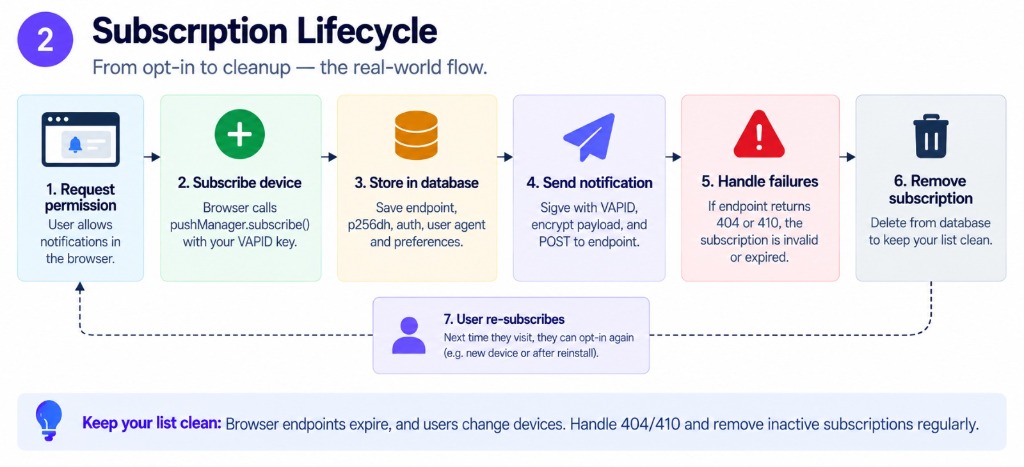
Then comes the cleaner decision. If a profile has just lost its last
subscription, push_notifications_enabled is set back to false:
SELECT COUNT(*) as count FROM push_subscriptions WHERE profile_id = $1
Flip the toggle off when the answer is zero, or the profile keeps counting as subscribed while nothing can reach it. A toggle that stays true with no delivery path is a lie you tell yourself in an admin dashboard.
Why the inbox is created even when push fails
Eligibility for a job alert never looks at your subscriptions, only at the toggle:
Recipients = profiles with push_notifications_enabled,
             NOT push_subscriptions
If you enabled alerts and then blocked the permission prompt, you still get the inbox row. The push is attempted only for the endpoints that exist.
Inserts carry a dedupe_key and rely on ON CONFLICT DO NOTHING, so a job
published twice, or a fan-out retried after a timeout, cannot put the same alert
in your inbox twice. The row text comes from one place, so the notification and
the inbox entry cannot disagree: the title is the job title capped at 200
characters, the body is one line, the company name plus just posted a frontend role, capped at 500. Nobody reads a paragraph in a notification.
Preferences: all, or only what matches
Two modes. all means every new frontend role. preferred filters on your
location and work model, and the matcher has one rule I would defend in review:
empty preferences must not starve you. If you picked preferred but never
filled in a city or a work model, you get everything.
The matching has to survive human input. Work models arrive as free text, so
Remote, remote, WFH, and work from home all normalise to remote, and
office means onsite. Locations are compared case-insensitively against the
job's location and job type together, so a remote role matches somebody whose
preference says remote, bangalore.
When both preferences are set they are ANDed. Both, not either. Either is how you get a notification for a job that fails half of what the person asked for.
Service worker decisions worth copying
The service worker handles the push event and draws the notification. Four decisions in it came from getting things wrong first.
No skipWaiting() on install. Claiming the new worker mid-session can blank
open tabs, so the worker waits. Activation is user-triggered: the update banner
posts a SKIP_WAITING message when someone accepts the update, and every other
deploy lands on the next full load.
Version the cache, and bump it deliberately. Ship new service worker logic
without bumping ofj-v8 and browsers keep serving the old runtime cache.
Private routes are network-only. /admin, /profile and /refer are never
cached or replayed. A cached authenticated page is one browser session away from
showing somebody else's data.
One action, not two. The notification has a single View button. A Save button
would need a Bearer token on a POST, and the service worker cannot read the
Supabase session, so it would have 401'd every time. The comment in sw.js says
so, which is cheaper than re-learning it in six months.
Tapping a notification focuses an open tab and navigates it instead of piling up a new tab per push.
What 200+ opt-ins taught us
The number on the admin dashboard counts profiles with the toggle on, not live endpoints. Both are real, they are just different sizes, and the endpoint count moves around more because it shrinks every time someone clears site data or uninstalls a browser. When you quote a subscriber number, say which one it is.
The toggle is the number that matters because the product does not depend on delivery: alerts exist in the inbox whether or not a single push makes it out, so a profile that opted in is a profile the feature works for.
Turning things off got the most attention. One flag, push_notifications_enabled,
read by two surfaces: the bell for a quick switch, the profile page for the
durable setting. Both read live runtime status instead of trusting the row, so
nobody is left guessing whether the browser actually agreed.
FAQ
Do web push notifications work on iPhone?
Only after Add to Home Screen. In a normal Safari tab there is no push and no error either, which is why the install nudge matters so much more on iOS than anywhere else.
Why did notifications stop after a browser update?
Usually a dead subscription, not a bug. Clearing site data, updating the OS, or uninstalling the browser kills the endpoint, and the next send returns a 404 or 410. We delete the row and, if it was the last one, switch the toggle off rather than pretend delivery still works.
Does the bell still work if I block notifications?
Yes. The inbox row is created from the toggle, not from a subscription, so blocking the prompt costs you the popup and nothing else. The alert is waiting next time you visit.
How many notifications will I get?
One per new frontend role that matches, deduped by dedupe_key, so a retry cannot
send the same job twice. all means every posting. preferred filters on the
location and work model you filled in, and falls back to everything if you left
those blank.
If this kind of teardown is useful, the Lighthouse and PostHog audit does the same thing for page speed.
Related reading
- Browse frontend developer jobs
- Frontend salary data for India
- What a perfect Lighthouse score really means
- Estimate your next offer