Building OnlyFrontendJobs · Full series →
Everybody “knows” pnpm is more efficient than npm.
Fewer duplicated packages. A global content store. Hard links instead of full copies. Conference talks and Twitter threads have repeated that story for years.
I knew it too. And on OnlyFrontendJobs I still typed:
npm install
npm run dev
Every day. For a long time.
This post is not another abstract “pnpm is better” list. It is what happened when several coding agents (Grok, Codex, Claude, Copilot) started working on the same repo, each with its own isolated checkout, and my disk filled with repeated node_modules.
If you are moving into multi-agent development — or you already have two tools open on one product — this is the map I wish I had before the mess.
Numbers below are from a real cleanup and migrate session on OnlyFrontendJobs (Next.js, TypeScript) on macOS in August 2026. Your sizes will differ. The shape of the problem will not.
The honest starting point
pnpm is not new. Worktrees are not new. npm is not “unsafe.”
What was true for me:
| Belief | Reality |
|---|---|
| “pnpm saves space” | Correct — I never acted on it |
| “npm is fine for one laptop, one branch” | Correct — until agents multiplied checkouts |
| “I should migrate someday” | Someday never arrived |
“npm run dev is just how you start a Next app” | Habit, not architecture |
I was not alone. A huge number of production Next apps still ship package-lock.json because:
- Create Next App and old tutorials default to npm
- Vercel, CI, and husky already work
- Switching lockfiles is a real PR, not a one-line change
- Nobody feels the cost until something multiplies installs
For me, that something was AI agents + Git worktrees.
What broke the habit
I started running multiple agents on OnlyFrontendJobs:
- One agent on a performance / ISR problem
- Another on content or scrapers
- Another on a small fix while I stayed on
main
Each agent wants isolation: do not touch my dirty working tree; do not fight over the same files.
The tooling answer is almost always:
Use a Git worktree.
That is correct for source code.
It is brutal for node_modules under npm.
What is a Git worktree? (the part everyone skims)
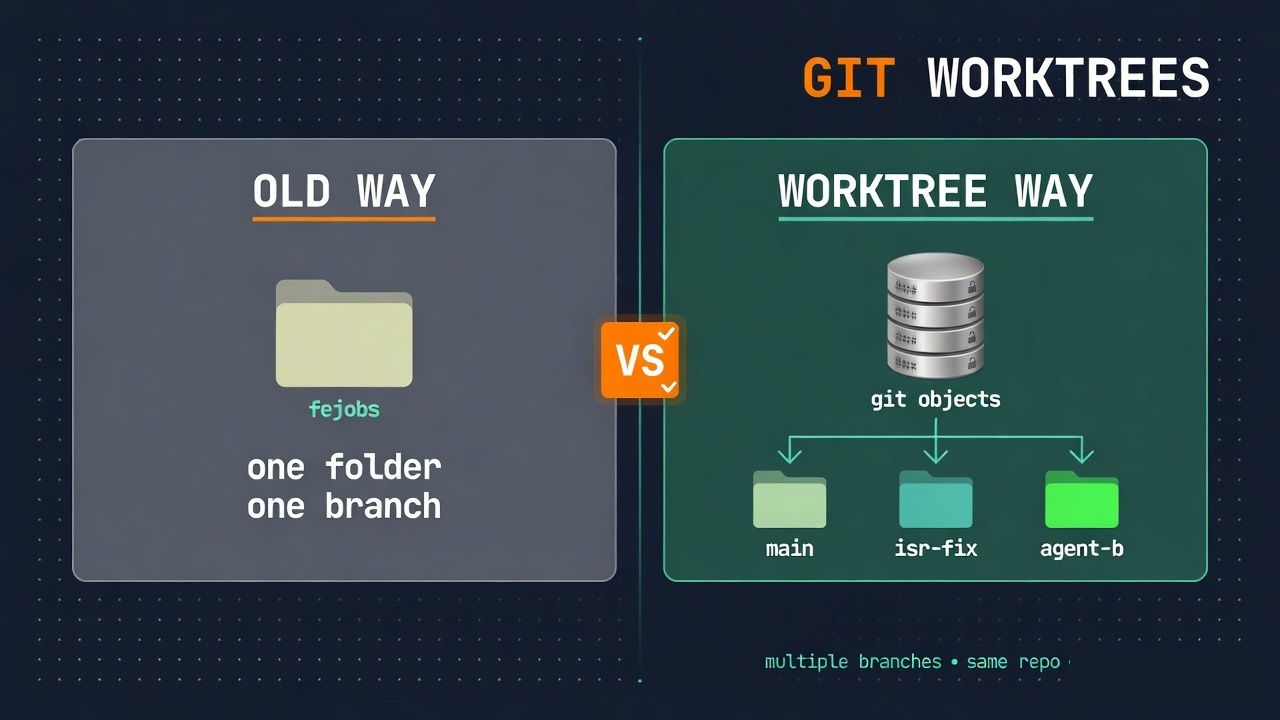
Most people think one folder is one repo and one branch. You git checkout feature/x. The whole folder switches. You cannot work on two branches in two folders without cloning the repo twice.
What worktree actually is: one repository object database, multiple working directories.
Commands you will see:
# list every checkout of this repo
git worktree list

# add a new folder + branch
git worktree add .worktrees/isr-fix -b fix/isr

# when done
git worktree remove .worktrees/isr-fix
git worktree prune
What is shared vs not shared
| Shared across worktrees | Not shared |
|---|---|
| Git objects (history) | Working tree files |
| Refs / branches (with care) | node_modules |
Config under .git | .next build cache |
| Local env files (unless you copy them) |
Git never installs dependencies.
A worktree is just another folder of source. When an agent (or a skill) runs npm install inside that folder, npm does what npm always does: write a full dependency tree into that folder’s node_modules.
That is the whole trap.
The disk trap in one picture
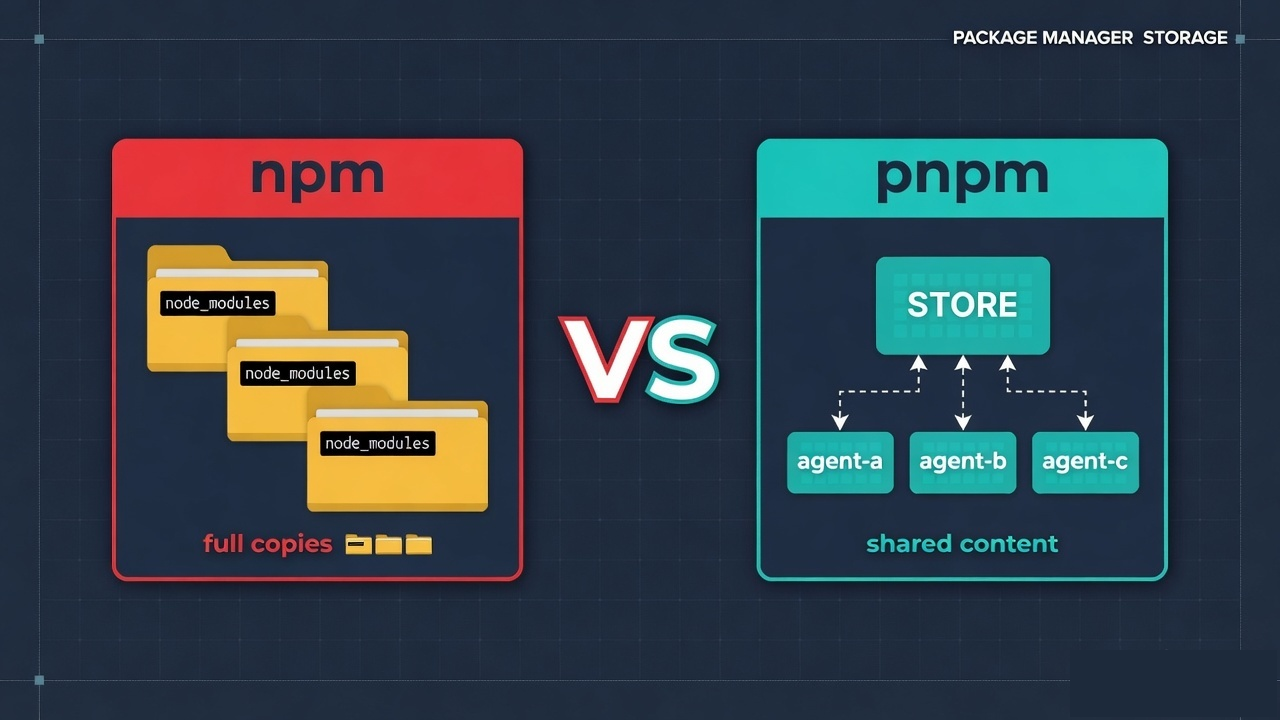
The five-agent picture is the shape of the failure, not a claim that this laptop held five live fejobs worktrees. On the migrate day, active worktrees were empty. The measured reclaim was ~5.3 GB of dead Desktop install trees and ~2.7 GB of this app’s .next cache.
The important distinction is simple: Git shares repository history, not your installed dependencies.
Each worktree has its own working directory. If npm installs dependencies in each one, the same package contents can be materialized repeatedly on disk.
Why npm behaves this way
npm’s model is project-local installation:
- Resolve the dependency tree from the lockfile
- Reuse/download package data through npm’s cache (
~/.npm) - Materialize the project’s dependency tree under
project/node_modules
The cache helps avoid repeated downloads. It does not turn multiple project directories into one shared node_modules tree.
Internet → ~/.npm cache → full files in each project/node_modules
From npm’s point of view, each worktree has its own project directory and therefore its own node_modules installation.
What pnpm does instead (store + links, plain English)
pnpm keeps a content-addressable store on the machine:
~/.local/share/pnpm/store/
  …/next@16.x/…     ← package body lives once
  …/react@19.x/…
Each project gets a node_modules layout backed by pnpm’s content-addressable store. Package files can be hardlinked from the store, while pnpm uses a symlinked structure inside node_modules to build the dependency graph. This avoids storing another independent copy of the same package contents for every project on the same filesystem.
                    ┌──────────────────────────┐
                    │  pnpm global store       │
                    │  (~1× package bodies)    │
                    └────────────┬─────────────┘
              hardlink │         │ hardlink
                       ▼         ▼
              ┌────────────┐  ┌────────────┐
              │ worktree A │  │ worktree B │
              │ node_modules → store       │
              └────────────┘  └────────────┘
| Setup | 1 worktree | 10 worktrees, same lockfile |
|---|---|---|
| npm | roughly the project install size | roughly scales with repeated project installs |
| pnpm | one shared store + per-project layouts | shared package contents + per-project layouts |
Hardlinks only work on the same filesystem. Keep worktrees on the same volume as the store (normal on a laptop home disk).
pnpm is not magic safety. It is a different disk model. Its dependency layout is stricter than npm’s traditional flat layout, so packages with undeclared/phantom dependencies can surface during migration. If compatibility requires hoisting, treat it as a deliberate migration workaround rather than a universal “Next.js setting.”
The pnpm model
You still get isolation of source and branch.
You reduce duplication of package contents because pnpm can reuse the same store across installs on the same filesystem.
Note: pnpm also has a global virtual store feature specifically aimed at reducing repeated
node_moduleswork across Git worktrees. This article's basic explanation focuses on the standard content-addressable store + link model.
What we actually did on OnlyFrontendJobs
Phase 0 — free space without migrating (do this first)
These are local cleanup operations, but do not remove a worktree until you have confirmed it contains no uncommitted work:
- Delete dead projects’
node_modules(Desktop alone reclaimed ~5.3 GB of install trees; source folders stayed). - Wipe local
.nextwhen you are not mid-debug (~2.7 GB on this app). npm cache clean --forceonly if you accept the re-download cost; npm’s cache is not the same thing as projectnode_modules.- Run
git worktree list, inspect abandoned worktrees, then remove only confirmed-unused trees; usegit worktree pruneto clean stale administrative metadata.
You can do Phase 0 tonight and leave npm alone. Disk still drops.
Phase 1 — install pnpm once on the machine
corepack enable
corepack prepare pnpm@10.14.0 --activate
pnpm config set store-dir ~/.local/share/pnpm/store
pnpm store path
For Node releases that include Corepack, enable it and pin the pnpm version. Node.js 25+ no longer bundles Corepack, so use a userland Corepack installation or another pnpm installation method there. Put the project version in package.json as packageManager.
Phase 2 — migrate one product repo (one PR)
Do not mix this with feature work.
Project .npmrc (only if your dependency graph needs compatibility settings):
# Only keep these if the existing dependency graph requires them.
# They are migration workarounds, not required for pnpm itself.
shamefully-hoist=true
strict-peer-dependencies=false
auto-install-peers=true
Convert lockfile:
pnpm import          # from package-lock.json when possible
pnpm install
rm package-lock.json
# package.json:
#   "packageManager": "pnpm@10.14.0"
#   pnpm.onlyBuiltDependencies for esbuild, @sentry/cli, etc. (pnpm 10 may skip dep scripts until allowed)
CI: every workflow that said npm ci / cache: npm becomes:
- uses: pnpm/action-setup@v4
  with:
    version: 10.14.0
- uses: actions/setup-node@v4
  with:
    node-version: '22'
    cache: pnpm
- run: pnpm install --frozen-lockfile
Husky / scripts: npm run typecheck → pnpm run typecheck.
Docs: README and agent instructions must say pnpm, or the next agent recreates package-lock.json.
Vercel: pnpm-lock.yaml is the important package-manager signal; packageManager can pin the intended pnpm version when Corepack is used. Keep only one authoritative lockfile, avoid conflicting lockfiles, and confirm the first deploy log after merge.
Verify before merge:
pnpm install
pnpm run typecheck
pnpm run test        # or your suite
pnpm run build
On this repo, after migrate: typecheck clean, job-intelligence tests 165/165, production build OK.
Phase 3 — fix the agent loop, not only the lockfile
A worktree skill that still runs npm install will undo your savings.
Rule set we wrote down:
- Prefer the main checkout for small patches.
- If isolation is required:
.worktrees/<name>(gitignored). - Install with
pnpm install --frozen-lockfile. - Cap live worktrees (we use 2–3 for this product).
- When the task ends:
git worktree remove— do not leave trees for weeks. - Never commit
node_modules. Do not recreatepackage-lock.json.
# Node setup inside a new worktree
if [ -f pnpm-lock.yaml ]; then
  pnpm install --frozen-lockfile
elif [ -f package-lock.json ]; then
  npm ci
fi
pnpm’s store is shared across those installs when the worktrees and store are on the same filesystem. The second worktree still has its own source tree and node_modules layout, but package contents can be reused from the store.
Day-to-day commands after the switch
| Old habit | New habit |
|---|---|
npm install | pnpm install |
npm ci | pnpm install --frozen-lockfile |
npm run dev | pnpm dev or pnpm run dev |
npm run build | pnpm run build |
npx tsx … | pnpm exec tsx … (or keep npx if you must) |
Starting the app is still one command. Only the package manager name changed.
What this does not fix
Be honest with yourself and your readers:
| Not fixed by pnpm | Why |
|---|---|
| Production page speed | Lockfile does not change LCP |
Abandoned .next caches | Still delete or ignore per tree |
| 12 old Desktop apps | Delete or archive; do not migrate them all |
| Agents that never clean worktrees | Process problem |
| Phantom dependency bugs | Stricter resolution may surface them; hoist or declare deps |
pnpm fixes package duplication.
It does not replace hygiene.
When you should stay on npm (for now)
Stay if:
- One human, one branch, one install, no agents, no worktrees
- You cannot afford a CI/lockfile PR this sprint
- A private package only works with npm’s exact layout and you have not tested hoist
Switch when:
- Two or more agents or humans use isolated checkouts
du -sh **/node_modulesscares you- You already pay for large monorepos or many apps on one machine
For OnlyFrontendJobs, the trigger was clear: multi-agent worktrees made npm’s per-tree copy tax visible.
Checklist you can copy
[ ] Measure: du -sh node_modules .next; git worktree list
[ ] Phase 0: remove dead node_modules; prune worktrees; optional .next wipe
[ ] corepack enable + pin pnpm version
[ ] One product: .npmrc → pnpm import/install → delete package-lock
[ ] packageManager field + onlyBuiltDependencies if pnpm 10 blocks scripts
[ ] All CI workflows + husky + README + agent skills
[ ] typecheck, tests, build green
[ ] Merge; confirm Vercel/CI logs show pnpm
[ ] Cap worktrees; remove them when agents finish
Closing
I did not migrate because a blog said “pnpm is modern.”
I migrated because multiple tools needed isolated folders, Git worktrees gave them isolation of code, and npm gave each project directory its own node_modules installation.
Worktrees are the right tool for parallel agent work.
pnpm is a strong default when those worktrees repeatedly install JavaScript dependencies and disk duplication becomes a real constraint.
If you still type npm run dev on a solo project, you are fine.
If your repo has become an agent bus station, measure node_modules once. Then decide.
References
pnpm (official)
- pnpm home — package manager docs and install
- Motivation — why a content-addressable store and hard links exist
- Symlinked
node_modulesstructure — how the layout differs from npm’s flat tree - Feature comparison — pnpm vs npm vs Yarn at a glance
- Continuous Integration — GitHub Actions /
pnpm/action-setuppatterns - pnpm + Git worktrees — multi-agent / multi-checkout disk model (official)
- Global virtual store — shared virtual store across checkouts (
enableGlobalVirtualStore) - Content-addressable store —
store-dir,pnpm store path, how the global store works - CLI:
pnpm import— generate a pnpm lockfile frompackage-lock.json - CLI:
pnpm install— install and frozen-lockfile usage - Config /
.npmrcoverview — project settings (hoist, peers, auth boundaries) - GitHub: pnpm/pnpm — source and issues
Git worktrees
- git-worktree documentation — official man page (
add,list,remove,prune) - Pro Git: advanced merges / multiple worktrees — broader Git tools context
Node, npm, Corepack
- Corepack (Node.js) — pin and run the package manager from
packageManager packageManagerfield —package.jsonconvention Corepack reads- npm: About package-lock.json — what npm locks
- npm:
npm ci— clean install from lockfile (what CI usually ran before) - npm: folders — where npm puts cache vs project
node_modules - npm:
npm cache— download cache only (not a shared project install)
Hosting / CI (typical Next.js path)
- Vercel: Package Managers — how Vercel detects pnpm vs npm from the lockfile
- pnpm/action-setup — GitHub Action used in the migrate workflows
- actions/setup-node — Node +
cache: pnpm
Building OnlyFrontendJobs
This post is part of Building OnlyFrontendJobs — real shipping lessons from the frontend job board (bugs, infra, agent workflows, performance). Not launch fluff.
| Series | Building OnlyFrontendJobs |
| This entry | Multi-agent worktrees, npm disk tax, pnpm migrate |
| Hub | onlyfrontendjobs.com/building |
Read the full list (episode numbers, titles, links) on the series board:
→ Building OnlyFrontendJobs — series index
Earlier parts on that board include waitlist bot spam, Vercel cost spikes, DNS, OAuth in WebView, double deploys, and Part 7 — Lighthouse looked perfect while real users waited.
Built while shipping OnlyFrontendJobs — curated frontend roles, not another generic board.